$ -> hyprctl version
Hyprland 0.50.1 built from branch at commit 4e242d086e20b32951fdc0ebcbfb4d41b5be8dcc  ([gha] Nix: update inputs).
Date: Sat Jul 19 21:37:06 2025
Tag: v0.50.1, commits: 6291
built against:
 aquamarine 0.9.2
 hyprlang 0.6.3
 hyprutils 0.8.1
 hyprcursor 0.1.12
 hyprgraphics 0.1.5


no flags were set
Hyprland config
end-4/dots-hyprland aka illogical-impulse
System info
OS: Arch Linux x86_64
Kernel: Linux 6.15.7-arch1-1
Describe your issue/feature…
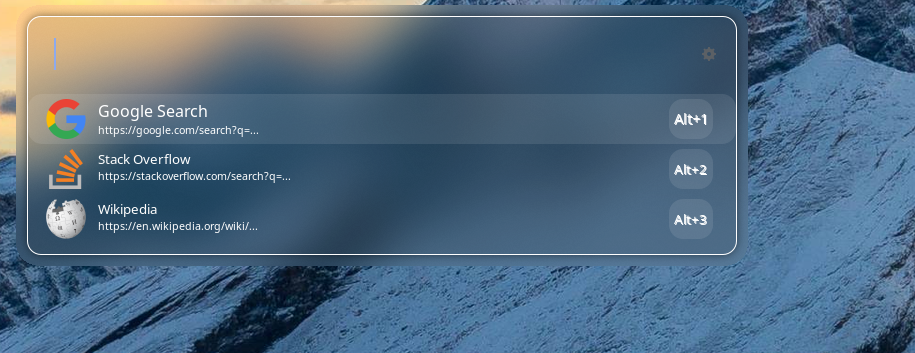
Around specific popups and context menus in hyprland, I get borders that are a blurred version of the background that would have been behind them.
Thanks a lot for the quick reply! I am actually not concerned with chromium, as I don’t use it; I just wanted to give an example.
I have an issue with the blur around ULauncher, as that is my favorite app launcher, and as you can see, it has transparency and background blur, which I would like to keep, so I assume noblur is not an option for that.
If I understood correctly, xwayland just supplies the area of the window, and you put a blurred version of the wallpaper behind the window there? That would make it very hard to both keep the blur and remove the blur around it…
Simplest solution is to not use your (browser, I presume) in xwayland.
Does this mean I should just not use the app (in this case, ULauncher, not Chromium) on hyprland, or did I miss something, and I can let it run in native Wayland?
Welp, that is unfortunate. I guess I will live with it (I mean it also has an aesthetic) because I don’t see any other launcher that I like as much as this one. If you have recommendations, feel free, but no need.